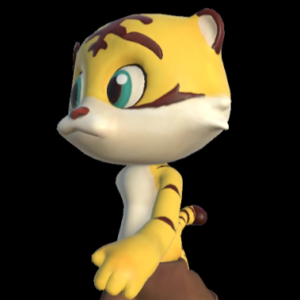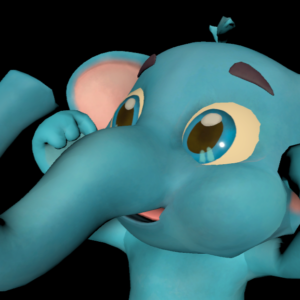
Constructivist Creations, a company that creates eLearning content for public and private educational institutions, embarked on the journey of creating a game to which I have the incredible opportunity to collaborate as a Character 3D Generalist. Togheter with Alex Maletich, the owner of the company, and Jessica Jayson, the main designer on the project, we are working on the many playable characters for the game, and Blue Elephant is one of them.
Initial Design and 3D Model
The process began with a sketch from the team, which acted as the character’s blueprint. My initial task involved creating a blockout—a rudimentary 3D model that set the character’s proportions. Subsequently, I transferred the mesh to ZBrush to create a high-poly version, adding more details and making adjustments to perfect the shape, particularly the ears.
Following this, I imported the sculpted mesh into Autodesk Maya to commence the retopology process.
In contrast to my approach with the Yellow Tiger character, I bypassed the detailed modeling and proceeded directly to texturing, as it allowed for greater control over the necessary detail level.
Details and Textures
Once I ensured the UVs were correctly done, I moved to the texturing phase in Substance Painter.
For Blue Elephant, the most important thing was making sure the ears were correctly textured since having the pink part of the texture be too thick, it wouldn’t look right when looking the character on the side.
Rigging in Maya
For the rigging process, just as I did for the Yellow Tiger character, I used a IK/FK system for the main joints and also created an IK one for the trunk. I also added a couple of extra joints for the tip of the trunk, so it could expand for certain emotions.
Another thing I needed to make sure I had was a way to change the curvature of his eyelids. For this I also added an extra controller that only appears when the character is blinking where I could move the center of the eyelids up or down based on the desired expression.
Animation Phase
In the last character showcase I did for Yellow Tiger, I didn’t mentioned the animation creation process since both animations made were basic things like IDLE state and walking. For Blue Elephant, not only I did those two animations, but I also did a celebration animation and a sad animation that will be played in different states of the game.
IDLE
Exhausted
Walking
animations
These were the first three animations I did.
These range from the most common animation that will be used in the videogame, so I followed an extremely similar path than the one I did for Yellow Tiger.
Sad animation
Celebration animation
For this animation I was inspired mostly by Mario Bros jump, where he stays in the air with his fist up. Because the main designer on the project wanted something more grounded, this evolved into a jump animation and both of his hands up, as you can see in the video below:
Final thoughts
Just as last time, working on this project is a great challenge, but with the objective of streamlining a fast pipeline for character creation.
I’ve worked on other characters for this very same project.
You can check them out here: